
See the history of your finance records
Do this when you need to know who did something in the ledger, and when.
Who can do this: You need Edit access to Finance Tracker. If you do not see Finance Tracker in the menu, ask your church admin.
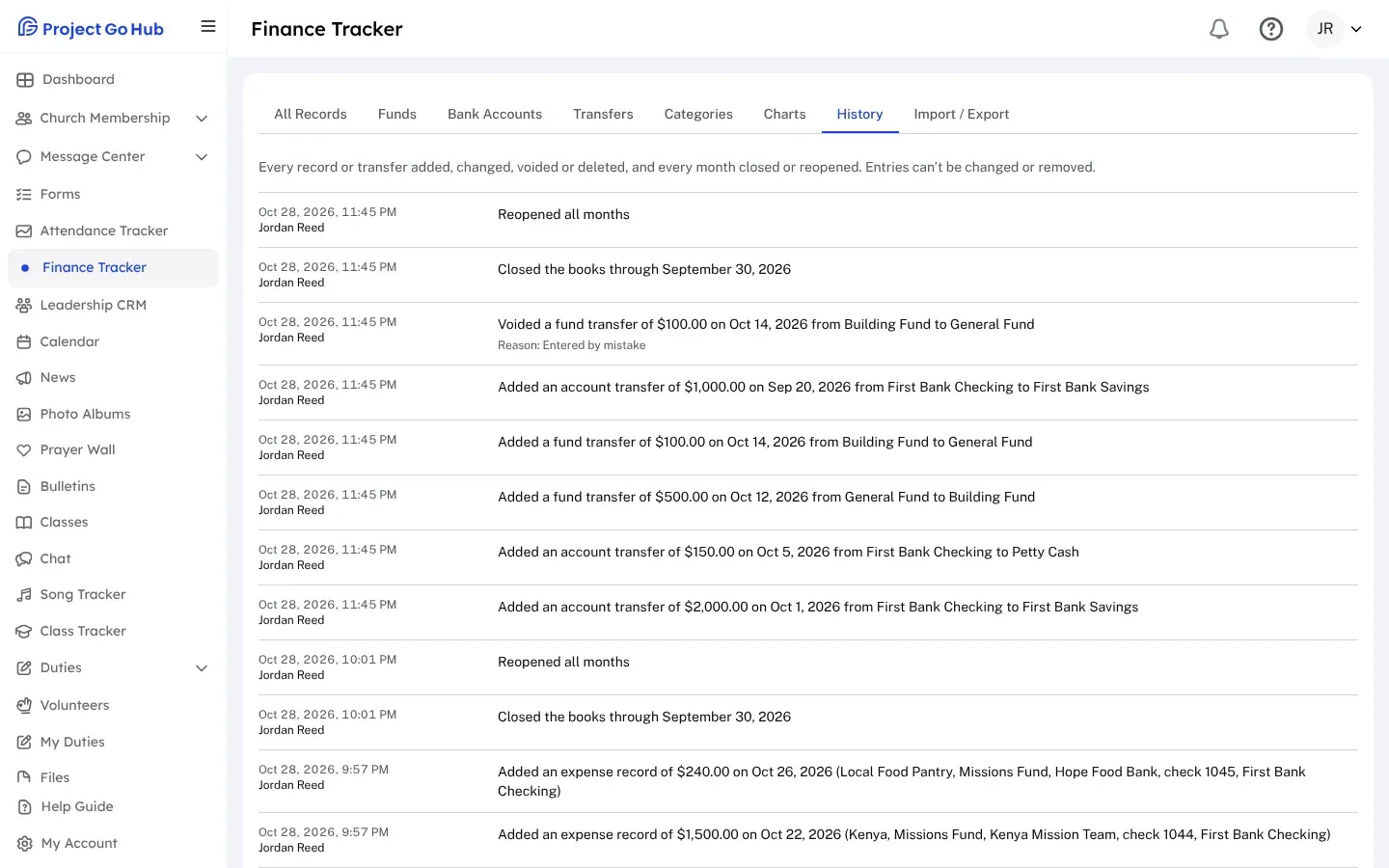
- Open the Finance Tracker. On a computer, click Manage > Attendance & Records > Finance Tracker in the menu. On a phone, tap Menu at the bottom, then go to Manage > Attendance & Records > Finance Tracker.
- Click the History tab. On a phone, if you do not see the tab, slide the tabs sideways.
- Read the list. The newest entry is first.
Each entry shows the date and time, the name of the person, and what they did. For example:
- Added an expense record of $60.00 on Oct 27, 2026 (Utilities, General Fund)
- Changed an expense record of $398.15 on Oct 8, 2026 (Utilities, General Fund), with a line under it such as Amount: $388.15 → $398.15
- Voided an expense record of $75.00 on Oct 20, 2026 (Utilities, General Fund), with Reason: under it
- Deleted a record, with what it was
- Added an account transfer of $2,000.00 on Oct 1, 2026 from First Bank Checking to First Bank Savings, or a fund transfer between funds
- Closed the books through September 30, 2026
- Reopened all months, or Reopened the months after a date
An added or changed record names its payee, check number and bank account too, when it has them.
Good to know
Section titled “Good to know”- The list has every record and every transfer added, changed, voided or deleted, and every month closed or reopened. The list also shows deposits, receipts, bank reconciliations and saved budgets. This includes records added by import, which say by import, and records deleted several at a time.
- When a record was changed, the lines under it show each thing that changed, from the old value to the new one. These can be the date, type, amount, category, fund, split lines, payee, check number or bank account. For a transfer, they can be the date, amount, From, To or memo. A payee, check number or account that was not there says none.
- Entries cannot be changed or removed by anyone.
- The list shows 50 entries a page. Click Next and Previous to move between pages.
- If the person who did it no longer has an account, it says A former user.
- If nothing has happened yet, it says Nothing has happened in the ledger yet.
- To void a record, see Void a record. To close a month, see Close a month.
Still stuck?
Section titled “Still stuck?”Use the Contact support page, or email [email protected]. Tell us your church name and what you tried.
Was this page helpful?
We record searches and page feedback, with no names, emails or IP addresses, to improve these articles.